Original lab · Privacy workflow
Can declared redaction zones be verified after the PNG is encoded again?
The lab uses a fully synthetic 640×360 source drawing with three invented strings, three in-bounds rectangles, and one out-of-bounds rectangle. It separates coverage evidence from the much harder question of whether the reviewer found every sensitive region.
Benchmark design
Accepted coordinate set
Three rectangles remain within a 640×360 image and are intended to cover the synthetic email, token, and reference strings after the source is rendered to PNG.
Rejected coordinate set
A rectangle begins at (620, 340) with size 80×40. Its right and bottom edges exceed the declared image dimensions and must not be silently clipped.
Method
- Render the passive SVG fixture to a PNG outside the tool, then load that PNG. SVG remains rejected as an active document format.
- Add the three declared regions manually and confirm their labels and coordinates.
- Rasterize solid fills into a new canvas rather than placing a removable visual overlay.
- Encode a new PNG, decode those exact bytes, and verify dimensions, fully opaque pixels, and uniform color inside every accepted rectangle.
- Inspect PNG chunks for sensitive metadata, hash the exported bytes, and visually review the entire image before sharing.
Fixture commands and hashes
On macOS, this command creates an accepted PNG input from the passive source. The fixture hashes below cover the checked-in source and coordinate bytes; the workbench receipt must cover the PNG and exported artifacts from the actual run.
sips -s format png \
  app/fixtures/flagship-editorial-20260713/screenshot/safe-synthetic-screenshot-source.svg \
  --out /tmp/fasttool-safe-synthetic-screenshot.png

shasum -a 256 app/fixtures/flagship-editorial-20260713/screenshot/*- safe-synthetic-screenshot-source.svgbf54a471127ed73367d85b1cacf6c00fa936db191c252aa1f51340a365465c89
- accepted-zones.json8c8e9a7e7c4fee1c5af416203f989aea8b62429976e5e7b3580eb96a9e2eb963
- rejected-zone.jsonb7f0403ef35ad87521cdccaa0beec40f64db4ff01ae849fdd7794cba7611b56f
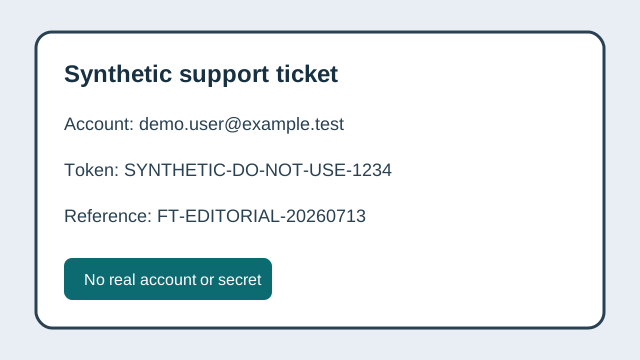
Deterministic fixture observations
| Case | Declared image | Zones | Geometry observation | Expected handling |
|---|---|---|---|---|
| Accepted zones | 640×360 | 3 | All rectangles have positive size and remain in bounds. | Eligible for pixel verification |
| Rejected zone | 640×360 | 1 | Right edge 700 and bottom edge 380 exceed the image. | Reject before export |
Geometry alone cannot prove that the correct content was selected. A live PASS requires re-decoded output-byte checks and a human whole-image review.
Limits and privacy
Limits
- OCR is intentionally disabled; the tool cannot discover an unselected secret.
- Uniform pixels prove declared rectangle coverage, not legal sufficiency or contextual anonymity.
- A receipt cannot prove that the original was deleted or that a recipient did not retain another copy.
Privacy boundary
Use synthetic or properly authorized images on a trusted device. The canonical tool keeps image pixels and generated artifacts in browser memory, but local malware, extensions, screen recording, and user sharing remain outside its control.
Official sources
Corrections
Report a coordinate, source, hash, or method error to [email protected] with the exact issue and evidence. FastTool is the accountable publisher; material corrections appear in the changelog. Reviewed 2026-07-13.