Practical guide · Screenshot privacy
How to redact a screenshot before sharing
Cover private details with solid fills, export a new PNG, then inspect that downloaded image—not just the editor. Start with a safe example if you want to see the process before using your own screenshot.
Published by FastTool · Guide updated October 1, 2026
The five-step workflow
- Prepare the smallest useful screenshot. Crop away unrelated windows and browser tabs first. Only use an image you are permitted to process and share.
- Open it in the Screenshot Redactor. Inspect the image at full size. Draw a rectangle around each sensitive item, leaving a margin around all characters and edges. Exact coordinate controls are available when drawing is awkward.
- Review the whole image again. Check names, addresses, account numbers, QR codes, notification previews and background windows. A selected region is a manual choice, not automatic detection.
- Select Generate verified redaction. The tool creates a new PNG with solid fills and reopens those encoded bytes to check the declared regions. A failed check does not unlock a successful export.
- Choose Download redacted PNG and open that file separately. Zoom in on every covered area, then inspect the rest of the screenshot. Share the new PNG, not the original or a screenshot of the editor.
If you change the image, region list or fill settings, generate the result again before downloading. Keep the final file distinguishable from its source so the wrong image is not attached by mistake.
Try it without a private screenshot
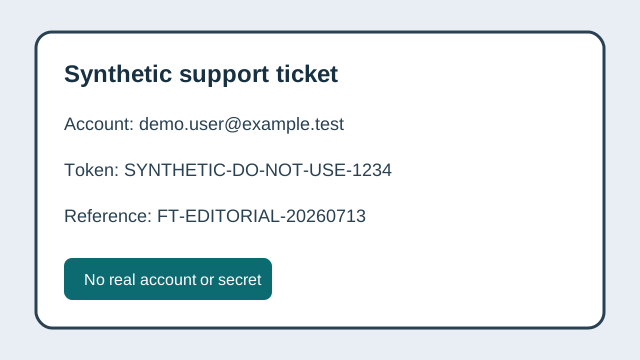
The tool has a built-in fictional support screenshot. It is generated in your browser and contains no real person, account or credential. No installation, terminal command or source-code checkout is needed.
- Open the sample area and select Load safe synthetic sample.
- Look at the three preselected regions covering an example email address, account ID and token. Other visible details remain outside them: this demonstrates why selecting every sensitive item is your responsibility.
- Select Generate verified redaction, then Download redacted PNG.
- Open the download in your normal image viewer. The three chosen regions should be solid fills. If you need another area covered, return to the editor, add it and generate a new result.
The sample teaches the interaction. It is not a customer result, a privacy certification or proof that an unrelated screenshot is safe to share.
What people often miss
Outside the main message
Check browser tabs, address bars, bookmarks, account avatars, the desktop, notification banners and other visible windows.
Information that is not a name
Look for QR codes, barcodes, order IDs, transaction amounts, location clues and timestamps. Decide what the recipient actually needs to see.
The file you send
Give the export a neutral name. A clean image can still be shared alongside a revealing filename, message or original attachment.
Already-shared information
Redacting a new copy does not change an old attachment or a recipient's copy. If a credential was exposed, hiding it in a later screenshot does not make the credential safe.
Why solid fills, not blur or a removable box?
A solid fill in a newly encoded PNG replaces the selected pixels. A shape that remains an editable layer or document annotation may only hide the original. Blur and pixelation retain visual structure and are not a suitable default for information that must be removed.
FastTool checks the exported PNG, not only the canvas preview. That distinction matters: the file you download is the one another person will receive.
When to stop and use another workflow
- You need automatic discovery. This tool does not perform OCR or find faces, plates or secrets. Inspect every region yourself.
- You are redacting a PDF or editable document. A screenshot tool is not a document-redaction tool. Hidden text, annotations, attachments and other pages require a separate review.
- You need legal, regulatory or forensic assurance. Browser checks do not certify compliance, authenticity or permission to share. Use an approved process and a qualified reviewer where required.
- The device or input is not approved for the task. Local processing does not remove risks from an untrusted device, extensions or the eventual recipient. Minimize the source and follow your organization's rules.
Image pixels are processed in the browser in this workflow. Normal page hosting, assets and consented analytics can still make network requests; see the privacy policy.
Optional: understand the verification report
The PNG is the ordinary sharing output. Technical review files are optional unless your own process requires them. They record selected regions and checks; they are not a substitute for viewing the full exported image.
What each check establishes—and what it does not
| Check | What it establishes | What it does not establish |
|---|---|---|
| Dimensions match | No accidental crop or scale in the encoded output | Correct region selection |
| Zone pixels opaque and uniform | Declared rectangles are solid in re-decoded bytes | Undeclared sensitive content is absent |
| Sensitive PNG chunks absent | Declared metadata boundary for the new PNG | No information remains visually |
| SHA-256 receipt matches | Artifacts are byte-identical to the reviewed export | Deletion, recipient behavior or legal approval |
If you need byte-identity verification, download the receipt and corresponding artifacts and use Receipt Verifier. Matching hashes identify the files; they do not approve their contents.
Original technical fixtures and exact identities
These downloadable fixtures document the technical method. They are not required for the browser sample above. The SVG is source material, not a supported image upload; the coordinate JSON is a record for inspection, not an import feature.
Inspect synthetic source SVG9630d009eff6a1877743ca98aa33b36b4345bd40ae9d113f9f4baebd86868458
Inspect accepted-region coordinates8c8e9a7e7c4fee1c5af416203f989aea8b62429976e5e7b3580eb96a9e2eb963
The browser sample is generated separately. Run the tool to obtain the actual output and receipt for your browser; do not treat an illustration or source-file hash as the exported image.
Sources and method
This guide describes FastTool's manual region selection, solid-fill rendering, PNG re-encoding and output checks. These primary references explain the underlying formats and APIs; they do not certify FastTool.
- W3C PNG Specification — image structure and ancillary data.
- WHATWG Canvas specification — drawing and image export.
- Web Cryptography API — digest operations for file identity.
- NIST SP 800-122 — context for protecting personally identifiable information.
Report a problem
Send the page, browser and steps to reproduce an issue to contact@fasttool.app. Use the synthetic sample or a redacted example; do not email a private original. FastTool is responsible for this guide and its corrections. See our editorial standards.
Guide wording and sample instructions reviewed October 1, 2026. This is not a new independent security certification or a claim that every image has been tested.